
Put Ofértamelo where customers already find you.
Add the quote button to your website, share your permanent link, or download a QR code. Each option opens the same customer experience.
Open installation settings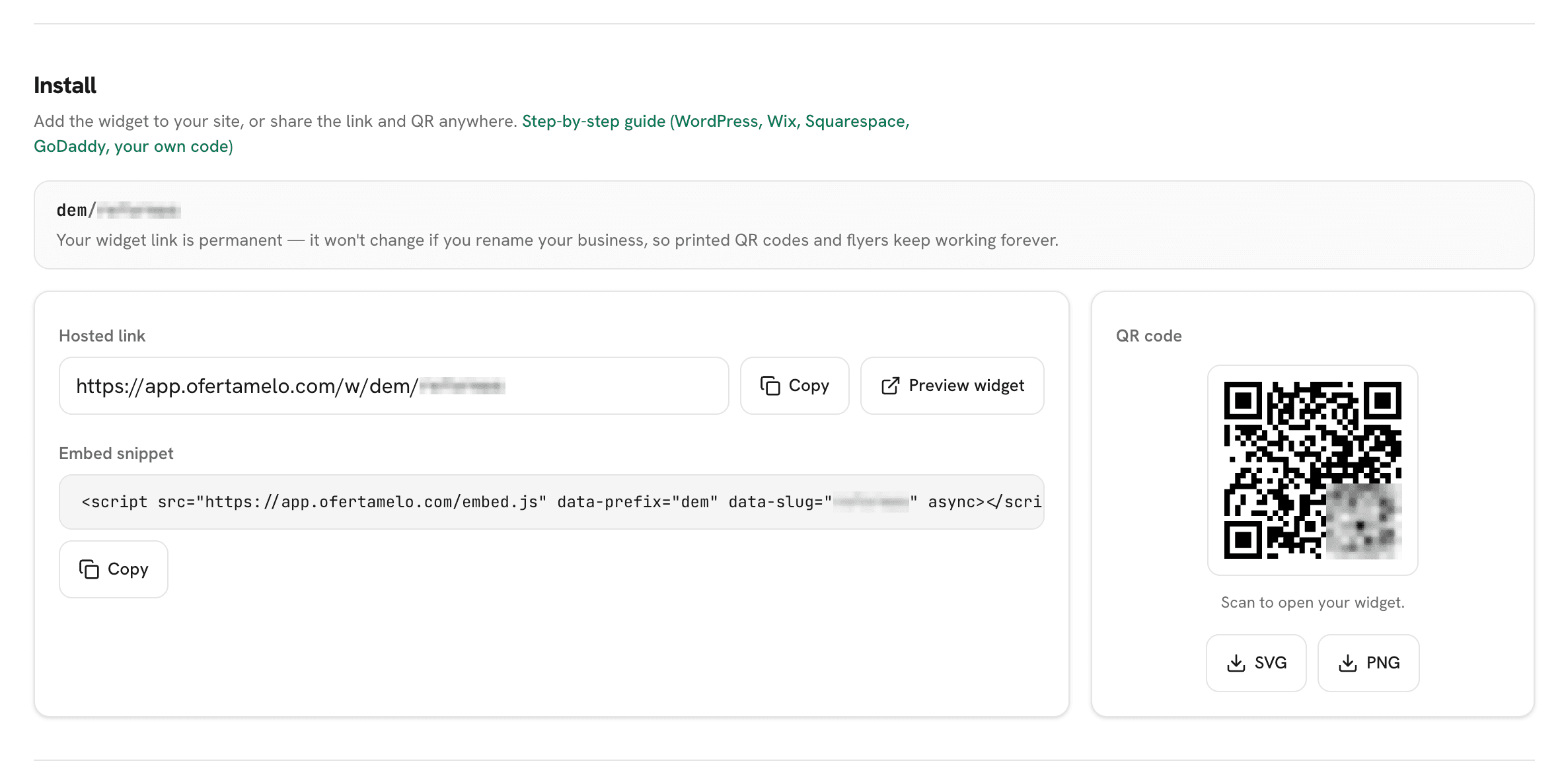
Choose how customers open it
Website button
Add Ofértamelo to your existing website. Customers remain on the page while the estimate experience opens over it.
Permanent link
Share the hosted link in an email signature, social profile, business listing, or direct message.
QR code
Add the QR code to vans, flyers, cards, folders, or shop windows.
Copy once, publish once.
Open the installation area in Ofértamelo and copy the website snippet provided for your account. Paste it into your website builder's custom-code area, publish the site, and check that the quote button appears.
If someone else manages your website, send them the copied snippet and this page.
WordPress
Use a custom HTML block, or your theme's custom-code area. Paste the snippet, publish, and check your live website.
Wix
Open Settings, then Custom code. Paste the snippet, publish, and check your live website.
Squarespace
Open Settings, then Advanced, then Code injection. Paste the snippet, publish, and check your live website.
Webflow
Open Project settings, then Custom code. Paste the snippet, publish, and check your live website.
Shopify
Open Online store, then Themes, then Edit code. Paste the snippet, publish, and check your live website.
GoDaddy
Add an HTML section, or use the site-wide code area. Paste the snippet, publish, and check your live website.
HTML
Paste the snippet before the closing body tag on every page where the button should appear. Paste the snippet, publish, and check your live website.
Use the link or QR code instead.
The hosted link is ready as soon as your first service is available. Share it anywhere a customer can open a web page.
The QR code opens that same link and remains usable when you update your services, prices, or business details.
Can I use Ofértamelo without a website?
Yes. Share the hosted link or use the downloadable QR code.
Do I need a separate installation for every service?
No. The same customer entry point displays all services currently available.
Why can I not see a service in the widget?
Check that the service is complete and visible. Sign in to see the account-specific checklist.
Where does the website button appear?
It appears in a consistent corner of the page and opens the estimate experience over the website.
Sign in to open this area of your account.
Open installation settings